
Contributing to esphome-docs
Our documentation can always be improved. We rely on contributions from our users to do so. If you notice an issue (for example, spelling/grammar mistakes) or if you want to share your awesome new setup, we encourage you to submit a pull request (PR).
The ESPHome documentation is built with Astro and Starlight,
using MDX (.mdx) files for all source content. MDX is Markdown with the ability to import and
use components. If you're not familiar with Markdown, see Markdown syntax for a quick primer.
Documentation guidelines
- Use the English language
- Documentation for any given component/platform should contain a minimal example for the component/platform.
In the example, do not include:
- Optional configuration variables
- Dependent components (Instead, include a sentence explaining the dependency and a link to the dependency's documentation)
- Pin numbers used in examples should be the string
GPIOXX-- not a specific pin number. - When adding (a) new component(s)/platform(s), be sure to update the main index page
appropriately:
- Insert your new component/platform alphabetically into the relevant list(s) -- do not just append to the end of any given component/platform list.
- If you need an image for your new component/platform, use our
component image generator. You can run this in a
container locally to generate the image or summon our bot to do so by adding a comment to your PR in the
esphome-docsrepository:@esphomebot generate image MyNewComponent
- If a component/platform is used exclusively/primarily on a single specific board (perhaps with dedicated pin numbers), a complete configuration for the component/platform on that specific board may be included as an example at the end of the document. This example must be clearly identified as being for that specific hardware and it may not replace the generic example configuration provided near the top of the document.
- An image is worth a thousand words; please use them wherever possible. Regardless, don't forget to optimize them so pages load quickly! You might try using https://tinyjpg.com and/or https://tinypng.com.
- When using highly accurate, domain-specific terminology, be sure that it does not interfere with a new user's ability to understand the content.
- Be sure to target the correct base branch of the
esphome-docsrepository:- Fixes/improvements for documentation must target the
currentbranch. - New features must target the
nextbranch.
- Fixes/improvements for documentation must target the
- Create new branches in your fork for each pull request; to avoid confusion (and other potential issues), do not
make changes directly in the
nextandcurrentbranches in your fork. - Wrap lines in all files at no more than 120 characters. This makes reviewing PRs faster and easier. Exceptions should be made only for lines which contain long links or other specific content/metadata that cannot be wrapped.
Contributing changes via GitHub
This guide essentially goes over the same material found in GitHub's Editing files in another user's repository. You may also find that page helpful to read.
At the bottom of each page in the docs, there is an "Edit page" link. Click this link and you'll see something like this:
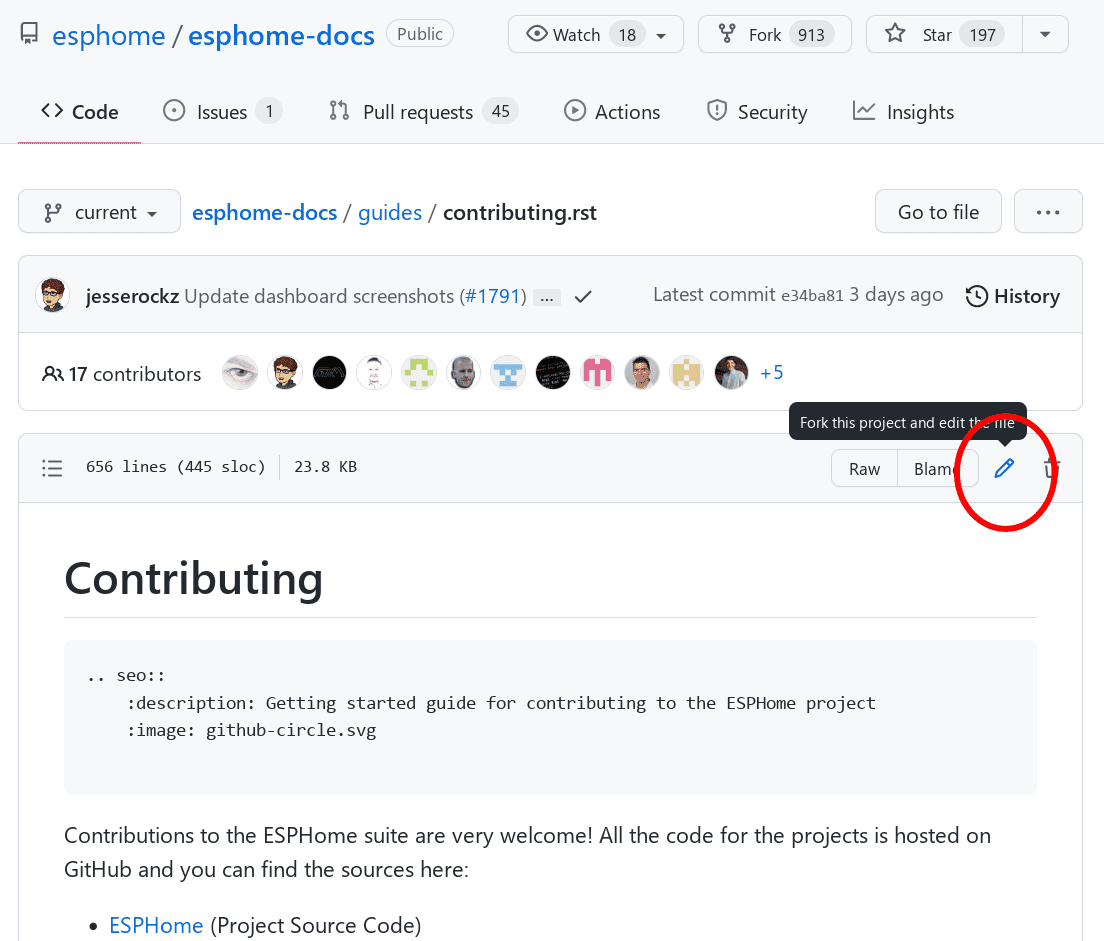
Click the edit button to start making changes. If this is your first time contributing, GitHub will ask you to fork the repository. Click "Fork this repository" to create your own copy where you can make changes.
Once the fork is created, you'll be taken to the editor. Make your changes, then click the "Commit changes..." button when you're done:
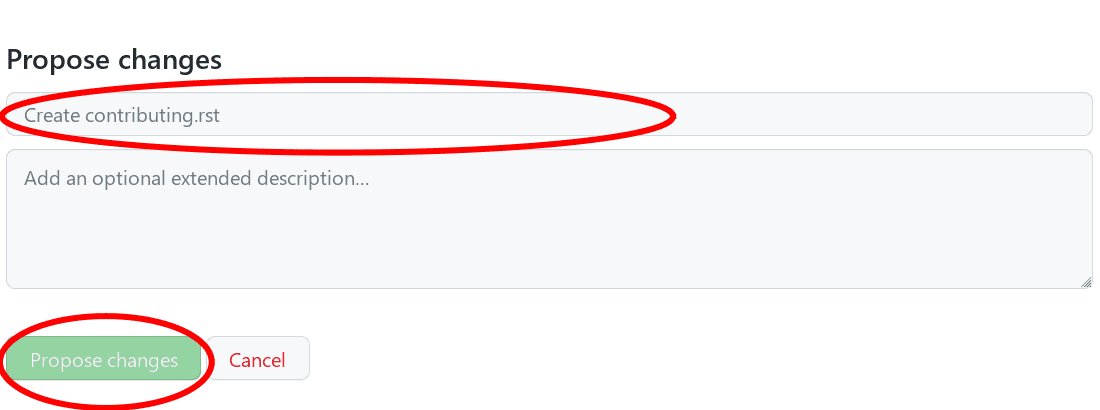
Give your changes a useful name and click "Propose changes". If you're unsure about syntax, see our quick primer.
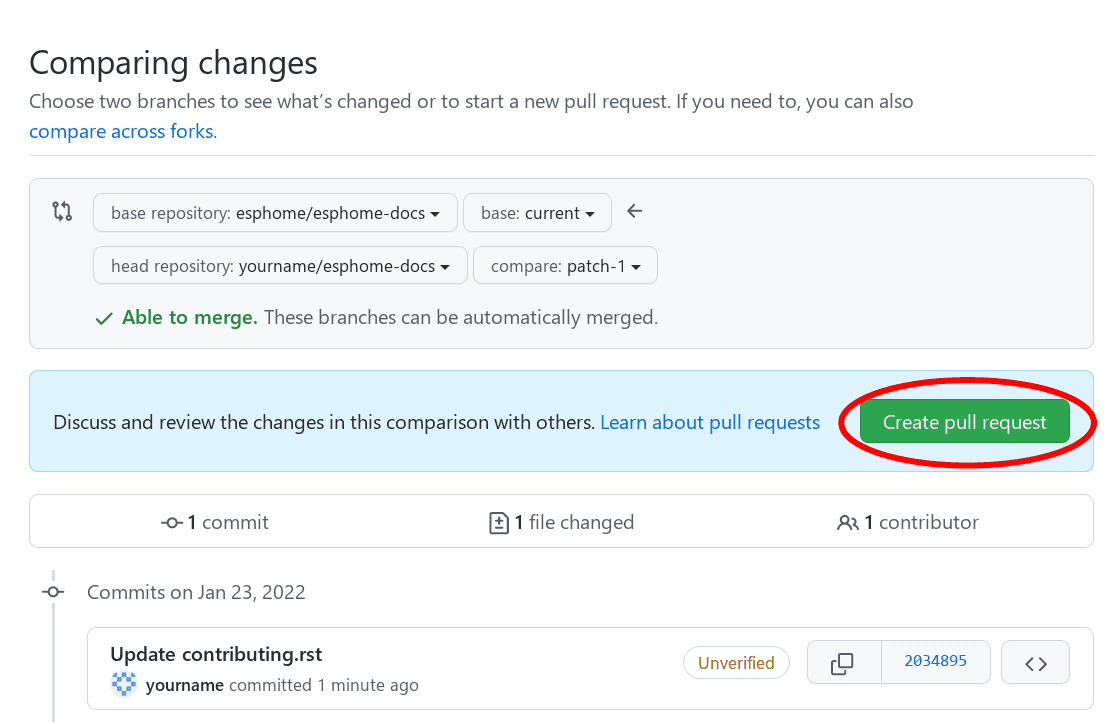
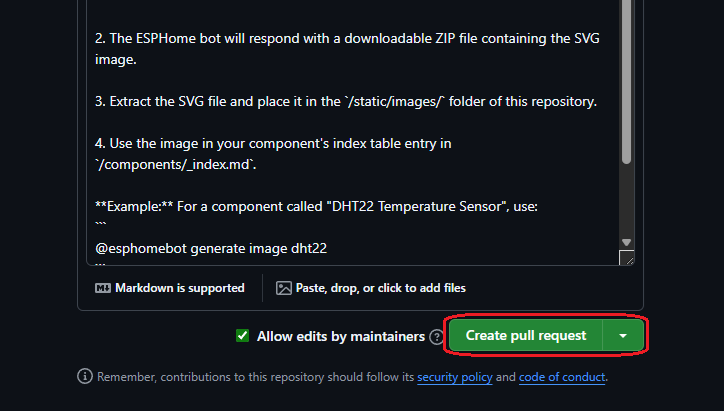
At this point, you've made the changes to your own personal copy of the docs in GitHub, but you still need to submit them to us. To do that, you need to create a "Pull request" (PR):
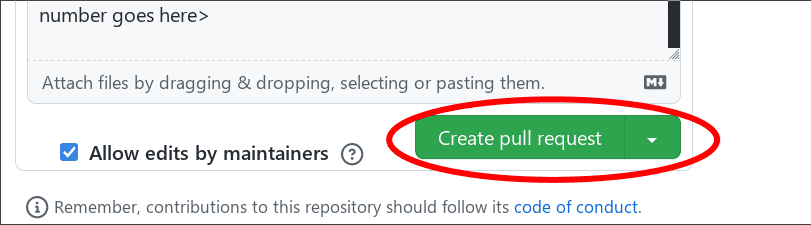
Complete the pull request form, replacing the [ ] with [x] to indicate that you have followed the instructions.
Note that there must be no spaces around the x when you populate it.
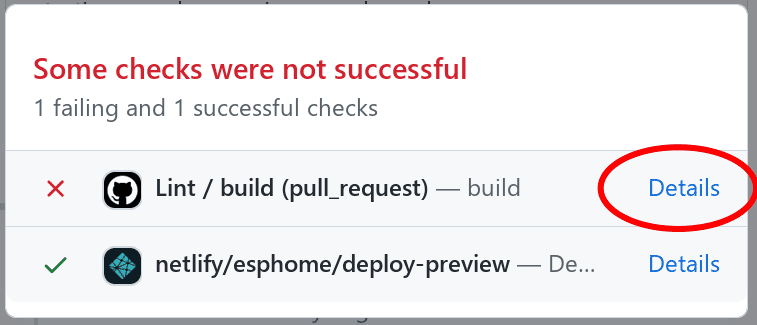
After a few minutes, you'll see either a green check ✅ or a red ❌ next to your commit in your pull request. If you see the red ❌, there is at least one error preventing your pull request from being fully processed. Click on the failing check to determine what's wrong with your change(s).
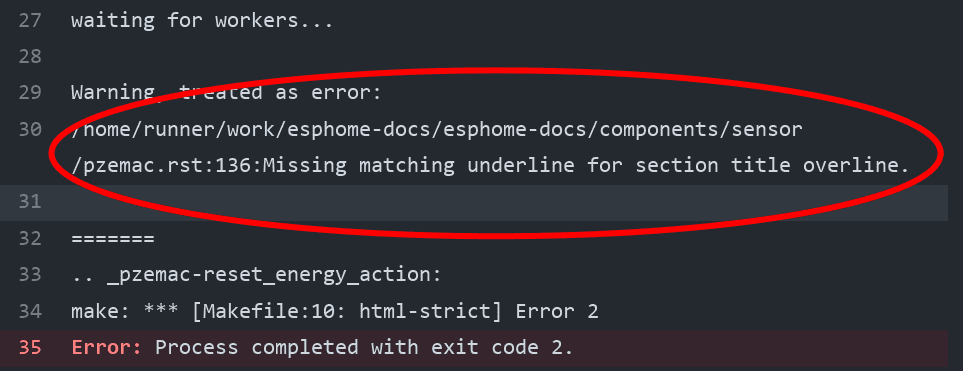
In this example, you would need to fix the reported error in your MDX file (such as a linting issue or formatting problem).
Once you make that change, the pull request will be tested & built again; ideally, this time there will be no remaining errors. If, however, more errors are discovered, simply repeat the process above to correct them.
Note
All tests must be passing before we will review (and merge) a pull request.
Build
To check your documentation changes locally, you first need Node.js (v18 or later). Then, from
the root of the esphome-docs repository:
npm install
npm run dev
This will start a development server with hot-reloading at http://localhost:4321/.
Other useful commands:
npm run build        # Build for production (outputs to dist/)
npm run preview      # Preview the production build locally
npm run lint         # Run the documentation linter
Markdown syntax
Here's a quick primer on writing documentation for the ESPHome docs (.mdx files):
Frontmatter
Every documentation page must start with YAML frontmatter:
---
title: "Page Title"
description: "Short description for meta tags and search"
---
Starlight uses the title field as the page's H1 heading, so do not include an H1 (#) in your content.
Headers
Use hash marks (#) for section headers. Start with H2 (##) since the page title comes from frontmatter:
## Configuration

### Advanced Options

#### Specific Setting
Note
- Section titles should use Title Case.
- The page title (H1) is defined in the frontmatter
titlefield, not in the Markdown content.
Links
Create a link to an external resource like this:
[Google.com](https://www.google.com)
Note
Referral links are only permitted if they provide a direct benefit to the ESPHome project. This policy applies to all official ESPHome documentation and websites.
Internal references
To reference other documentation pages, use Markdown links with absolute paths:
[ESP32 BLE Tracker](/components/esp32_ble_tracker/)
[WiFi](/components/wifi)
[sensors](/components/sensor/)
To link to a specific section using anchors:
[Installation section](/guides/getting_started#installation)
Headers automatically create anchor IDs by converting them to lowercase and replacing spaces with hyphens.
To create a custom named anchor (for example, to preserve links from old URLs), use an HTML span:
<span id="my-custom-anchor"></span>
Inline code
To have text appear like this, use single backticks:
To have text appear `like this`, use single backticks.
To have text appear like this, use single backticks.
Code blocks
To show a sample configuration file, use fenced code blocks with triple backticks and a language identifier:
```yaml
# Sample configuration entry
switch:
  - platform: gpio
    name: "Relay #42"
    pin: GPIOXX
```
# Sample configuration entry
switch:
  - platform: gpio
    name: "Relay #42"
    pin: GPIOXX
Configuration variables
When documenting configuration variables, use this format:
## Configuration variables

- **name** (**Required**, string): Description of the parameter.
- **optional_param** (*Optional*, int): Description. Defaults to `42`.
- **mode** (*Optional*, string): Mode selection. One of `auto`, `manual`. Defaults to `auto`.
Use bold for required variables and italic for optional variables.
Images
The documentation uses Astro's image handling. There are two approaches depending on whether the image is used in one document or shared across multiple pages.
Local images (used in a single page) are stored in an images/ directory alongside the .mdx file and imported
at the top of the file:
import { Image } from 'astro:assets';
import myDeviceImg from './images/my-device.jpg';

<Image src={myDeviceImg} alt="My Device" layout="constrained" />
Shared images (used in multiple pages or in ImgTable components) are stored in /public/images/ and referenced
with absolute paths:

For images with captions, use the Figure component:
import Figure from '@components/Figure.astro';
import myDeviceImg from './images/my-device.jpg';

<Figure src={myDeviceImg} alt="My Device" caption="A photo of the device" layout="constrained" />
Note
All images in the documentation need to be as small as possible to minimize page load times. Typically, the maximum size should be roughly 1000x800 px or so. Additionally, please use online tools like tinypng or tinyjpg to further compress images.
Notes and warnings
Use GitHub-style alerts (standard Markdown extension):
> [!NOTE]
> This is a note.
> It can span multiple lines.

> [!WARNING]
> This is a warning.
> Use this for important cautions.

> [!TIP]
> This is a helpful tip.
Note
This is a note.
Warning
This is a warning.
Italic and boldface font families
To italicize text, use one asterisk around the text. To put a strong emphasis on a piece of text, put two asterisks around it.
*This is italicized.* (A weird word...)

**This is very important.**
This is italicized. (A weird word...)
This is very important.
Ordered and unordered lists
Create lists using standard Markdown syntax:
- Unordered item

  - Unordered sub-item

- Item with a very long text so that it does not fully fit in a single line and
  must be split up into multiple lines.

1. Ordered item #1
2. Ordered item #2
-
Unordered item
- Unordered sub-item
-
Item with a very long text so that it does not fully fit in a single line and must be split up into multiple lines.
-
Ordered item #1
- Ordered item #2
Importing components in MDX
Because the documentation uses MDX, you can import and use Astro components. Imports go at the top of the file, after the frontmatter:
---
title: "My Component"
description: "Description"
---

import { Image } from 'astro:assets';
import Figure from '@components/Figure.astro';
import APIRef from '@components/APIRef.astro';
import myImg from './images/my-image.jpg';

Content starts here...
Commonly used components:
Image(fromastro:assets): Optimized image displayFigure(from@components/Figure.astro): Image with optional captionAPIRef(from@components/APIRef.astro): Links to C++ API documentationImgTable(from@components/ImgTable.astro): Grid of component cards with images (used on index pages)
Component pages
Component documentation lives in src/content/docs/components/. Simple components are a single .mdx file (e.g.,
wifi.mdx). Components with sub-platforms use a directory with an index.mdx and additional files (e.g.,
binary_sensor/index.mdx, binary_sensor/gpio.mdx).
When adding a new component, you'll need to add it to the appropriate index page using the ImgTable component.
Component thumbnails should have an aspect ratio of 8:10 (or 10:8) but exceptions are possible. These images must
be placed in /public/images/.
Because these images are served on the main page, they need to be compressed heavily. SVGs are preferred over JPGs and JPGs should be no more than 300x300px.
If you have imagemagick installed, you can use this command to convert the thumbnail:
convert -sampling-factor 4:2:0 -strip -interlace Plane -quality 80% -resize 300x300 in.jpg out.jpg
Project structure
For reference, the esphome-docs repository is organized as follows:
esphome-docs/
├── src/
│   ├── assets/                      # Static assets (logos, etc.)
│   ├── components/                  # Astro components (Figure, APIRef, etc.)
│   ├── content/
│   │   └── docs/                    # MDX documentation files
│   │       ├── components/          # Component documentation
│   │       ├── automations/         # Automation documentation
│   │       ├── guides/              # General guides
│   │       ├── cookbook/            # How-to recipes
│   │       └── changelog/           # Version changelogs
│   └── styles/                      # CSS files
├── public/
│   └── images/                      # Shared images (multi-use, ImgTable)
├── astro.config.mjs                 # Astro/Starlight configuration
└── package.json                     # Node.js dependencies
For more information on Markdown syntax, please refer to the Markdown Guide or CommonMark specification.